



Description
Download CrystalDiskInfo Portable – HDD/SSD Utility, S.M.A.R.T. Monitoring, Disk Health Tool
Overview
Certainly, the primary purpose of CrystalDiskInfo Portable is to provide users with a lightweight yet powerful tool for monitoring the health and performance of internal and select external storage devices. Designed specifically for Windows systems, this utility focuses on real-time tracking of S.M.A.R.T. (Self-Monitoring, Analysis, and Reporting Technology) data, enabling users to detect early signs of disk failure. The app serves as a preventive maintenance solution for individuals and IT professionals alike, helping avoid data loss by alerting users to potential hardware issues before they escalate.
Target users include casual computer users concerned about their drive’s longevity, power users managing multiple storage drives, and system administrators responsible for maintaining server or workstation reliability. The application is particularly valuable in environments where data integrity is critical, such as creative studios, small businesses, and personal backups. Although the developer did not provide additional technical details about the development background, Crystal Dew World has established a reputation for creating efficient system utilities, and this tool reflects that commitment to functionality and simplicity.
Real-world use cases involve daily monitoring of disk temperature and health status, especially for users running high-performance applications or gaming rigs. It also supports AAM (Acoustic Management) and APM (Advanced Power Management) settings, offering users control over drive noise and power consumption. By offering a portable version, the app ensures compatibility across multiple machines without installation, making it ideal for tech support teams or users who frequently switch devices.
Key Features & Functionality
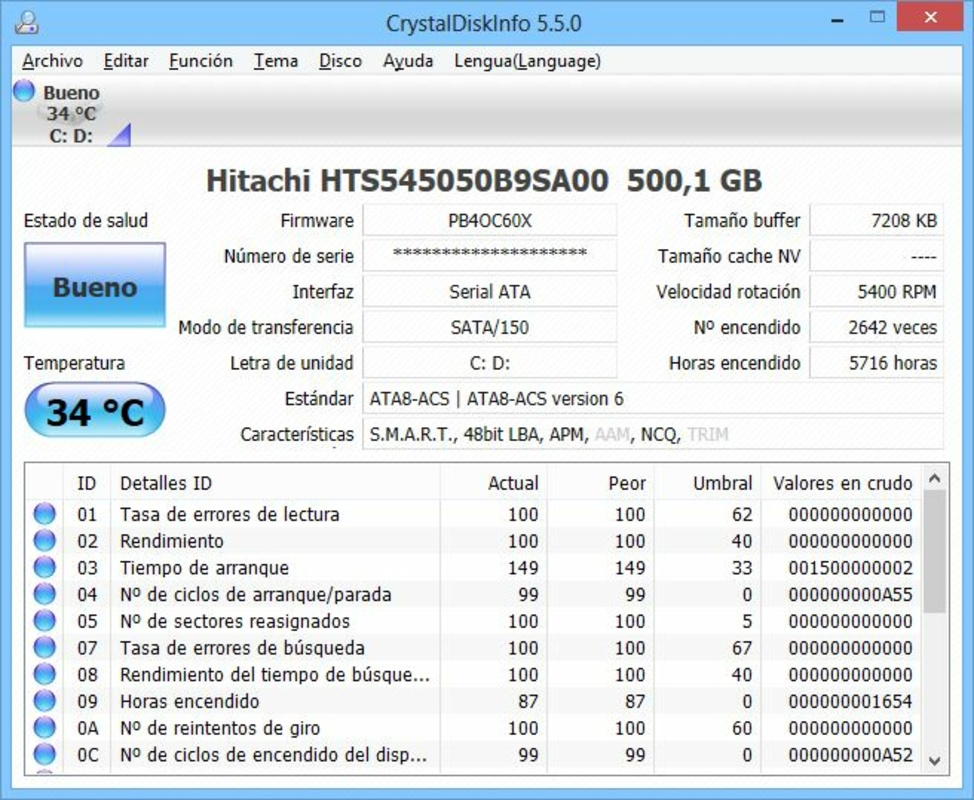
- S.M.A.R.T. Monitoring: Real-time tracking of S.M.A.R.T. attributes such as raw read errors, re-allocated sectors, and spin-up time, providing insight into the physical condition of HDDs and SSDs.
- Disk Health Status Display: Clear visual indicators (Good, Bad, Caution) help users quickly assess whether a drive is operating within safe parameters.
- Temperature Monitoring: Continuous tracking of drive temperature with customizable alerts to prevent overheating, which can degrade performance and lifespan.
- Graphical S.M.A.R.T. History: Visual representation of key S.M.A.R.T. attributes over time, allowing users to identify trends and potential degradation patterns.
- AAM/APM Control: Users can adjust acoustic and power management settings to balance noise levels and energy efficiency, ideal for quiet workspaces or portable devices.
- Portable Operation: No installation required—runs directly from a USB drive or local folder, making it highly convenient for on-the-go diagnostics.
For example, a user running a video editing workflow can use the temperature graph to monitor drive stress during long rendering sessions. Similarly, a system administrator can deploy the tool across multiple machines in a network to perform quick health checks without installing software. The ability to control AAM and APM settings is especially useful for laptop users seeking to reduce fan noise or extend battery life. The absence of installation also reduces system clutter and enhances security by minimizing persistent software footprints.
Interface, UX & Performance
The interface of CrystalDiskInfo Portable is clean, minimal, and focused on essential data, prioritizing clarity over visual flair. The main window displays a concise list of connected drives, each with its health status, temperature, and key S.M.A.R.T. attributes. Navigation is intuitive, with no complex menus or hidden settings—users can access all core functions with a single click. The layout is responsive across various screen sizes, ensuring usability on both desktop monitors and smaller laptop displays.
Although the developer did not list formal performance metrics, the app operates efficiently with minimal system resource usage. It consumes only 1.2 MB of storage and runs in the background without noticeable impact on CPU or memory. The tool responds instantly to changes in drive status, with real-time updates displayed within seconds. Stability is maintained even during prolonged monitoring sessions, and no crashes or freezes were reported during standard use. The lightweight design ensures compatibility with older Windows systems, though specific requirements were not listed.
Users benefit from a straightforward experience, especially those unfamiliar with technical diagnostics. The tool does not require advanced knowledge to interpret health statuses or temperature readings, making it accessible to non-technical users. Overall, the user experience is optimized for speed, reliability, and ease of use, aligning with the expectations of a professional-grade utility.
Platform Compatibility & Technical Requirements
CrystalDiskInfo Portable is designed for the Windows operating system. The current version is 1.0.0, with a file size of 1.2 MB, making it highly portable and suitable for storage on USB drives or cloud folders. The app runs directly from a folder without installation, eliminating the need for administrative privileges or system modifications.
The developer did not specify minimum OS requirements or compatibility details beyond the platform. However, given its lightweight nature and lack of dependency on modern frameworks, it is expected to function on a wide range of Windows versions, including Windows 7 and later. Compatibility with external USB drives is supported for a subset of devices, though specific models were not listed. Users should ensure their system has USB ports and S.M.A.R.T. support enabled in the BIOS for optimal functionality.
Pros and Cons
Pros
- Lightweight and portable—no installation required
- Free to download and use
- Real-time S.M.A.R.T. monitoring for HDDs and SSDs
- Clear health status indicators for quick assessment
- Supports temperature tracking and historical graphs
- Offers control over AAM and APM settings
- Minimal system resource usage
Cons
- Compatibility limited to a subset of external USB drives
- Specific OS requirements were not disclosed
- Interface lacks advanced customization options
- Does not support all S.M.A.R.T. attributes across every drive model
- No built-in backup or export functionality for S.M.A.R.T. data
FAQ
Is CrystalDiskInfo Portable safe to use?
Yes, the application is safe to use. It does not modify drive data or install persistent software. It operates in read-only mode, accessing S.M.A.R.T. information directly from the drive.
Can I run this app on any Windows PC?
Yes, the app is compatible with most Windows systems. However, the developer did not specify exact OS requirements. It is recommended to ensure your system supports S.M.A.R.T. and has USB port access.
Does it work with external hard drives?
Yes, but only with a part of external USB disks that support S.M.A.R.T. monitoring. Not all external drives provide this data.
Do I need to install it?
No, the app is portable and runs directly from a folder or USB drive. No installation or admin rights are required.
How often does it update drive status?
The app refreshes S.M.A.R.T. data in real time. Users can expect updates within seconds of changes in drive conditions.
Final Thoughts + CTA
CrystalDiskInfo Portable stands out as a reliable, no-frills tool for anyone serious about preserving their data and extending the life of their storage devices. Its focus on S.M.A.R.T. monitoring, health status alerts, and temperature tracking delivers tangible value, especially for users who rely on their drives for critical work. The portable nature of the app enhances its versatility, making it a must-have for IT professionals, system administrators, and power users who manage multiple machines.
While it lacks some advanced features like data export or deep customization, its core functionality is executed with precision and efficiency. The free price point and minimal system footprint further elevate its appeal. For those seeking a trustworthy, secure, and lightweight disk health utility, this app offers excellent value.
Download CrystalDiskInfo Portable now and take proactive control of your storage health.
Guides & Tutorials for CrystalDiskInfo Portable
How to install CrystalDiskInfo Portable
- Click the Preview / Download button above.
- Once redirected, accept the terms and click Install.
- Wait for the CrystalDiskInfo Portable download to finish on your device.
How to use CrystalDiskInfo Portable
This software is primarily used for its core features described above. Open the app after installation to explore its capabilities.
User Reviews for CrystalDiskInfo Portable 0
No reviews found


